Fake Reset Alerts vs Official Prompts: How to Spot a TikTok Phishing Scam
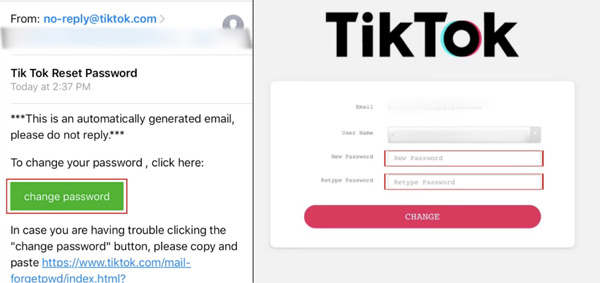
A notification buzzes on your phone at 3:14 a.m.: an urgent alert claims someone in another country just requested a password reset for your TikTok profile. Below the warning sits a convenient, high-contrast button inviting you to cancel the request or secure your account immediately. For millions of creators and everyday users, panic dictates the next tap. That single reflex is handing full administrative control of high-value profiles straight to credential syndicates. As highlighted in a recent All About Cookies Report tracking major social engineering scams, automated lures disguising themselves as system warnings have become the dominant vector for account takeovers this year.
Social media account hijacking is no longer driven by blunt-force password guessing. Instead, sophisticated campaigns weaponize psychological pressure through hyper-realistic phishing email alerts and SMS lures that mimic the platform's native interface down to the exact hex color codes and font rendering. Dissecting the technical anatomy of legitimate security dispatches against their counterfeit clones reveals why these attacks succeed and how account owners can neutralize them before losing access.
📌 Key Takeaways:
- The Deception: Scammers use spoofed sender identities and replica web views to intercept user credentials and real-time verification tokens simultaneously.
- The Primary Tell: Legitimate system notices never direct users to external domains or ask them to type existing passwords to cancel an unsolicited reset request.
- The Critical Action: If an unauthorized request lands in your inbox, bypass the message entirely, inspect active sessions inside the native app, and execute unauthorized device removal immediately.
The Surge in Weaponized Reset Notifications
Credential harvesting rings have industrialized account compromise. In mid-September 2026, cybersecurity research published by Hacked.com documented a wave of automated botnets triggering waves of secondary reset prompts across thousands of public handles. By pinging the platform's public recovery endpoint, attackers generate an authentic SMS verification code or email notice to confuse the victim. Immediately afterward, the attacker sends a spoofed message warning of suspicious login attempts, directing the mark to an external portal designed to collect their credentials.
This dual-touch tactic exploits alert fatigue. When users see a legitimate ping alongside a counterfeit warning, critical thinking gives way to urgency. Attackers prioritize TikTok accounts not just for creator fund balances or linked payment methods, but for distribution reach. A verified profile or an account with a few thousand followers serves as prime real estate to push cryptocurrency scams, fake affiliate marketplaces, or malware-laden downloads to an unsuspecting audience.
How Credential Harvesting Pages Clone Official Prompts
The visual fidelity of modern scam pages is remarkably deceptive. Fraud rings rip the platform’s front-end code, hosting identical stylesheets, iconography, and multi-language selectors on lookalike domains. These URLs often incorporate legitimate brand terms flanked by deceptive subdomains or hyphens, such as tiktok-verification-security.com or account-support-tiktok.net.
Once a target enters their current password on the spoofed landing page, the malicious server relays those details to the legitimate platform in real time. If the target has enabled two-factor authentication, the phishing page instantly loads a second prompt asking for the one-time code sent via SMS or authenticator app. When the user submits the digits, the attacker’s backend consumes the session token within seconds. The attacker changes the associated email address, binds an untracked burner phone, and locks the rightful owner out before any defensive action can occur.
Real Notification vs. Phishing Trap: The Structural Differences
Authentic security correspondence follows strict delivery protocols. While bad actors spend substantial effort perfecting their visual layout, underlying technical headers and redirection pathways reveal the fraudulent nature of the communication.
| Security Vector | Official TikTok Security Prompt | Phishing Trap Architecture |
|---|---|---|
| Sender Domain | Strictly from verified domains: @tiktok.com or internal in-app System Notifications. | Spoofed webmail, freemail domains, or deceptive lookalike domains (e.g., @support-notice-tiktok.com). |
| Link Destination | Directs strictly to https://www.tiktok.com/... or opens the native app via deep-linking protocols. | Masked hyperlinks, URL shorteners, or punycode redirects leading to third-party servers. |
| Credential Handling | Prompts you to define a new password; never asks for existing passwords to stop a reset. | Demands old password entry, account passwords, or identity cards under the guise of verification. |
| Two-Factor Flow | Uses device-level hardware tokens, passkeys, or direct numeric validation. | Interception bots scrape one-time codes through live man-in-the-middle reverse proxies. |
| Urgency Strategy | Neutral advisory informing the user a request occurred, expiring quietly if ignored. | Extreme psychological pressure: threats of deletion, suspension, or legal fines within minutes. |
Scrutiny must focus heavily on reset link verification. If a message contains a hyperlink, examining the destination URI on a desktop or long-pressing the link on mobile reveals whether the host is genuinely hosted under the platform's root domain. Any redirect chaining through intermediary staging links signals an immediate threat.
Evicting Attackers: Device Management and Session Revocation
When an intruder slips past perimeter security, their initial objective is session entrenchment. They will link alternative third-party accounts, like burner Google or Apple profiles, preventing the primary owner from regaining control through routine recovery paths.
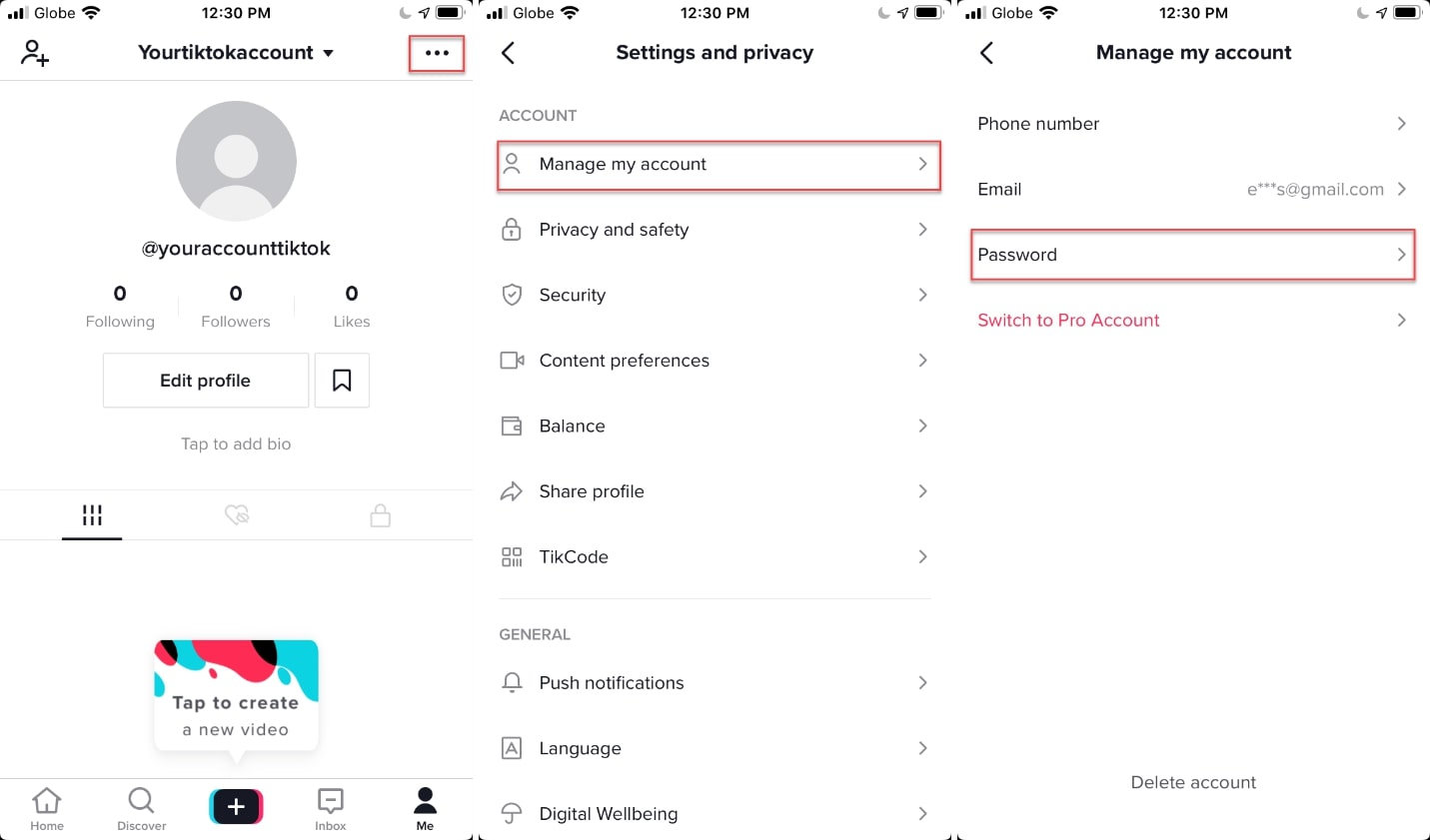
Defeating this intrusion requires immediate session isolation. Victims must open the authentic mobile application, navigate to their profile, select Settings and Privacy, and enter the Security panel. Inside this menu lies the option to manage trusted devices. This pane displays every phone, tablet, and browser instance currently holding active authentication cookies.
Identifying an unfamiliar operating system or geographic location requires prompt execution of unauthorized device removal. Tapping the trash icon next to an anomalous hardware record immediately destroys the remote token, evicting the intruder. Doing this before the attacker updates the primary email address creates a narrow operational window to initiate a legitimate TikTok password reset from inside the authorized hardware boundary.
Advanced Defense: Two-Factor Authentication and Escalation Paths
Basic phone-number verification is no longer sufficient to stop skilled credential harvesters. SIM-swapping vulnerabilities, SS7 cellular flaws, and interception proxies enable attackers to bypass plain text codes with alarming efficiency. Hardening an account requires layering advanced authentication primitives.
Under your platform security settings, activate two-factor authentication anchored to dedicated hardware keys or standalone authenticator applications (such as Aegis, 1Password, or Google Authenticator) rather than standard cellular numbers. Hardware-bound security keys, including FIDO2 tokens, eliminate the risk of reverse-proxy credential harvesting: a fake domain simply cannot authenticate against a hardware-registered token, breaking the attack chain completely.
When an attacker successfully takes over an account and alters primary credentials, self-service tools stop working. In these cases, users must initiate hacked account troubleshooting by submitting a direct ticket to TikTok customer support via the feedback form or in-app recovery path. Documenting past account usernames, past bound phone numbers, exact creation dates, and historical purchase receipts from linked TikTok Shop orders provides the cryptographic and paper trail needed for platform administrators to verify genuine ownership and restore access.
Frequently Asked Questions (FAQ)
Q1: What should I do if I clicked a link inside a fake reset email and submitted my credentials?
A1: Open your legitimate mobile application immediately without using the web link. Change your password inside the app settings to instantly terminate existing external credentials. Enter the Security panel, select the menu to manage trusted devices, and delete every hardware profile you do not recognize. If you share that password across other services, change those passwords immediately and enable hardware-backed two-factor authentication.
Q2: Why do I keep receiving unexpected reset codes via SMS when I did not ask for one?
A2: Attackers are likely submitting your username into the platform's public recovery form to trigger legitimate platform alerts, attempting to cause alert fatigue or provoke an error. Do not interact with any incoming links or secondary phone calls asking you to read back the digits. The platform will not call you to ask for this code. As long as you never share that numeric secret, your profile remains secure.
Q3: How can I verify that a security warning email actually came from the platform?
A3: Inspect the raw email headers to evaluate the DKIM (DomainKeys Identified Mail) and SPF (Sender Policy Framework) authentication status. Genuine alerts pass alignment checks for the official corporate domain. Additionally, look at your in-app inbox under System Notifications: any critical security intervention, device breach, or password reset action initiated by the service will appear simultaneously within the application’s internal notification feed.
Protecting Creator Identities Against Automated Exploits
The industrialization of social media theft turns every active inbox into a target for credential harvesters. Attackers rely on human vulnerability: panic, urgency, and the fear of losing an audience built over years of work. Security cannot rely on blind trust in digital alerts. Treat unsolicited reset requests with skepticism, verify communication channels manually, and replace vulnerable SMS verification methods with hardware-backed security to keep your digital identity protected.
