Paraglider Rotation vs. Zonai Wing Steering in TotK: Fact-Checking Flight Controls

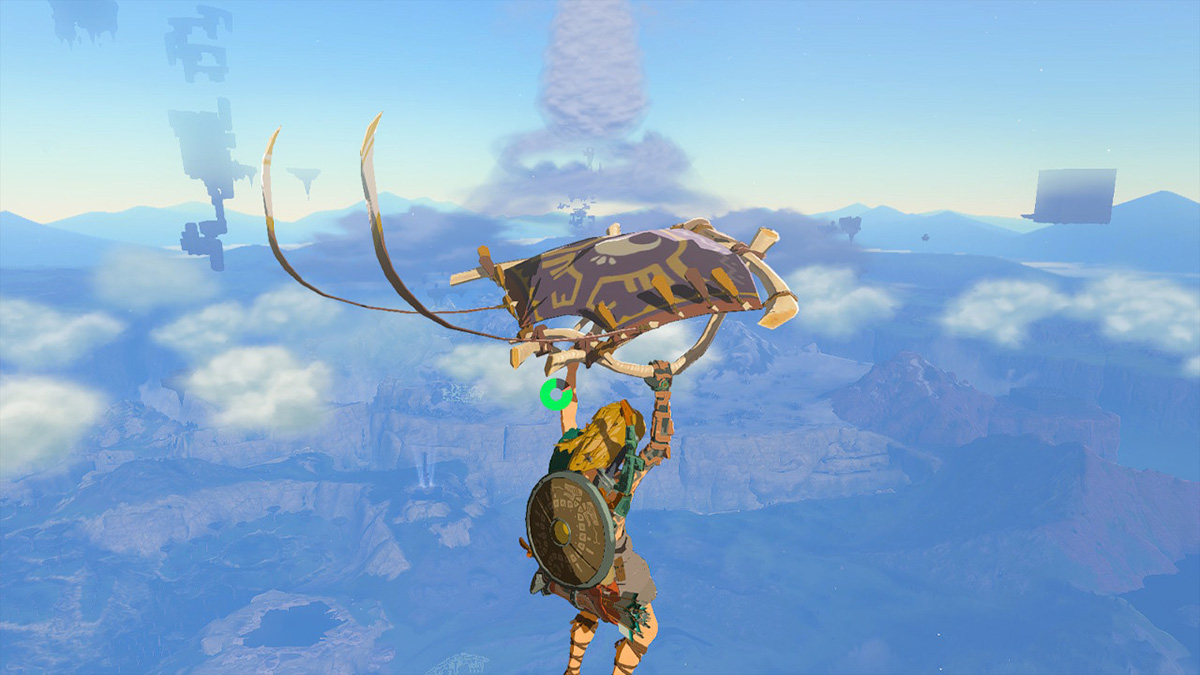
Plunging from a sky island into the open expanse of Hyrule remains one of the most liberating experiences in The Legend of Zelda: Tears of the Kingdom, yet players frequently encounter an irritating mechanical barrier: Link's paraglider refuses to spin in place. Aerial traversal requires navigating floating archipelagos, turbulent slipstreams, and vast chasms, but search feeds remain flooded with players asking how to rotate their paraglider mid-flight. Much of this confusion stems from conflating basic glider navigation with the responsive steering mechanics of Zonai vehicles, as well as early viral footage showcasing the Kotaku Report on boundless mid-air stamina exploits.
The reality of Hyrule’s aerodynamics comes down to understanding rigid engine physics. The paraglider operates on vector-based drift rather than vehicular yaw, pitch, and roll.
📌 Key Takeaways:
- Control Separation: The right analog stick controls only mid-air camera rotation, while the left analog stick dictates Link's lateral drift vector relative to the active camera viewpoint.
- Mechanical Boundaries: The paraglider cannot rotate in place without forward momentum; sharp pivots require quick-canceling into bullet time or dropping into a freefall dive.
- Craft vs. Cloth: True multi-axis rotation, banking, and elevation control belong exclusively to the Zonai Wing and Zonai steering stick systems, not Link’s handheld glider.
The Paraglider Control Dilemma: Camera Movement vs. Directional Drift
The paraglider does not function like an aircraft. Moving the right analog stick swings the third-person camera 360 degrees around Link, but his hands remain locked to the glider's struts, drifting forward along whatever heading you maintain.
Link’s paraglider directional controls depend entirely on the left analog stick, which steers his horizontal momentum relative to the screen. Pushing forward pushes Link away from the camera. Pulling back turns him around toward the screen in a broad, momentum-preserving arc. Link cannot pivot on his heel or spin like a top while maintaining stationary elevation. The physics engine treats the cloth canopy as an air-resistance parachute that trades altitude for steady forward momentum.
New players often fight the controls by spinning the right stick and wondering why Link's body does not bank. If you want to change your direction smoothly, rotate your camera to face the desired destination first, then push the left analog stick directly forward. Link will carve a gradual, wide curve until his torso aligns with your reticle.
Snapping Link’s Heading: Bullet Time and Dive Mobility Transitions
When wide turning radiuses aren't fast enough, such as dodging an unexpected Aerocuda projectile or lining up a narrow landing platform, standard glider steering fails. Advanced traversal requires input cancels that bypass standard turning limits.
The fastest technique to pivot Link mid-flight is mid-air bow aim bullet time. Tapping ZR immediately stows the paraglider and triggers slow-motion archery mode. During bullet time, Link can instantly swivel his torso to aim in any direction, regardless of previous momentum.
By pulling ZR, whipping the camera toward your target, and instantly pressing X to redeploy the paraglider, you snap Link's flight path instantly. This technique consumes a minor sliver of stamina for drawing the bow, but it eliminates the sluggish drift arc completely.
Another clean turnaround method utilizes the dive mobility transition. Pressing B stows the paraglider, sending Link into freefall. Holding R immediately initiates a high-speed dive, which offers sharper directional handling and faster horizontal repositioning. Once you adjust Link’s vector toward your intended drop point, pressing X reopens the paraglider. Combining drops, dives, and sudden glider snaps allows you to weave through Sky Island traversal hazards without burning out your stamina wheel.
Pairing these cancels with Tulin's Gust ability elevates your control even further. Activating Tulin creates a horizontal gale that propels Link straight ahead. If you misjudge the blast and head off-target, stowing the paraglider mid-gust, realigning Link via bullet time, and redeploying will redirect your forward momentum instantly.
Paraglider vs. Zonai Wing: Comparing Hyrule's Aerial Mechanics
A primary reason players search for paraglider rotation is the visual confusion between Link’s cloth canopy and the rigid Zonai Wing. The Wing is a full flight vehicle with pitch, roll, and stall dynamics, whereas the paraglider is a simple descent damper.
Understanding where each mechanic excels prevents wasted Zonaite and accidental falls:
| Flight System | Turning Radius & Rotation Method | Altitude Loss Rate | Primary Tactical Role |
|---|---|---|---|
| Standard Paraglider | Wide, sweeping arcs via Left Stick; instant heading snaps via ZR bow cancels. | Constant steady descent; tied directly to stamina depletion. | Short-to-medium hops, safe drop recovery, and precision landing on cliffs. |
| Freefall Dive (R held) | High responsive tilt; fast heading redirection with wide aerial shift. | Extremely rapid descent; zero stamina cost during descent. | Vertical drop alignment, Chasm descents, and quick velocity corrections. |
| Zonai Wing (Foot Steered) | Weight-shifting banking; Link walks along edges to tilt wings and pitch nose. | Low descent while maintaining airspeed; stalls if pitched up too long. | Early-game cross-island gliding without requiring battery charges. |
| Zonai Wing (Steering Stick) | Full 360-degree yaw, banking, and pitch inputs directly via Left Stick. | Zero descent if fitted with active propulsion; craft despawns after 75, 80 seconds. | Long-distance automated navigation and precise combat strafing runs. |
Attempting to "steer" a paraglider like an airplane leads directly to missed landings. If tight 90-degree bank turns are what you need, build a vehicle with a Zonai steering stick rather than relying on Link's personal fabric glider.
Stamina Management and the Realities of Infinite Flight
Precise flight control is useless if your stamina wheel burns out mid-transit. Managing your green rings dictates how far you can travel and how many tactical maneuvers you can afford.
Long-distance sky travel relies on understanding glide stamina drain. While deployed, the paraglider constantly drains stamina. If you initiate wide turns by sweeping the left stick repeatedly, Link spends extra seconds drifting through wider arcs, bleeding altitude and endurance before reaching the landing zone. Snapping Link’s heading using the ZR-cancel technique consumes less total stamina over long distances than letting him coast through lazy turns.
Community testing following the game's release brought forward an infinite flight stamina trick: by rapidly stowing and redeploying the glider, Link falls faster but halts horizontal stamina burn during the drop. While falling, stamina does not regenerate naturally on its own without touching ground, but mid-air consumption drops to zero during the freefall window.
For truly limitless flight without building Zonai contraptions, seasoned runners pair this drop-and-pop rhythm with stamina-recovering elixirs or roasted Endura Carrots. Popping an Endura dish mid-flight completely refills all three wheels and grants bonus yellow stamina, allowing Link to span entire map quadrants using nothing more than cloth and wind currents.
Lookout Landing Customization and Atmospheric Aerodynamics
Shortly after reaching Lookout Landing and acquiring the paraglider from Purah, players discover Sayge’s fabric remodeling services at the Kochi Dye Shop in Hateno Village. By presenting textiles earned through Amiibo scans, side quests, and photographing Hyrule’s wildlife, players can swap out the paraglider's cloth pattern.
Custom fabrics do not alter your flight physics or steering responsiveness. Equipping the Nostalgic Fabric, the Sheikah Fabric, or the Aerocuda Fabric will not grant tighter turning radiuses, reduced stamina burn, or altered weight distribution. The changes are purely cosmetic, though certain patterns (like the Gleeok Fabric or the Stalnox Fabric) emit a faint glow in pitch-black environments like the Depths.
Environmental physics, however, dramatically reshape how your glider responds. Updrafts generated by grass fires, hot springs, or burning Hylian Pinecones override normal control vectors, pushing Link straight up regardless of stick inputs.
To turn while caught in a thermal updraft, let the rising hot air carry Link to the apex of the draft first, cancel out of the current with B, orient your camera toward your exit vector, and press X as you leave the turbulence.
Frequently Asked Questions (FAQ)
Q1: Can I make Link rotate in place while hovering with the paraglider?
A: No. Link cannot rotate on a fixed vertical axis while gliding. The paraglider only moves forward relative to where Link is facing. The right analog stick turns the camera, not Link. To reorient him quickly on the spot, briefly tap ZR to draw your bow in bullet time, spin to your desired direction, and press X to redeploy.
Q2: Why does my paraglider turn so slowly compared to Zonai flying machines?
A: The paraglider is modeled after a simple unpowered deceleration canopy, so it features high aerodynamic drag and sluggish turning. Zonai Wings utilize dedicated lift physics, and adding a Zonai steering stick bypasses manual drift entirely to give you direct vehicular control over yaw, pitch, and roll.
Q3: Does the Glide Armor set make the paraglider turn faster?
A: No. The Glide Armor set (Mask, Shirt, and Tights) drastically improves Link’s mobility and horizontal trajectory during the freefall dive, not while the paraglider is deployed. Upgrading the full set to level two also grants the "Impact Proof" set bonus, eliminating all fall damage when hitting solid ground.
Q4: How do I change flight direction without losing precious altitude?
A: The best method is summoning Tulin's Gust ability while facing your new destination. Tulin gives you a flat horizontal thrust that propels you directly along your chosen heading without dropping altitude, avoiding the elevation loss that comes from wide manual drift turns.
Traversing Hyrule’s Skies with Precision
Hyrule's vast vertical map demands an understanding of the game's actual movement limits. The paraglider was never engineered as an acrobatic stunt craft; it is a controlled descent tool designed to break falls and carry momentum along straight vectors.
Attempting to treat it like a motorized aircraft will only drain your stamina wheel and send Link tumbling into chasms. Master the drop-and-pop cadence of bullet-time cancels, utilize dive transitions to reorient your heading, and save your true banking turns for a proper steering stick and Zonai Wing. Approaching Hyrule’s airspace with the right mechanical toolkit makes every sky island hop effortless.
