Sniffies Map for the Curious: The Complete Beginner’s Guide to Browsing Safely

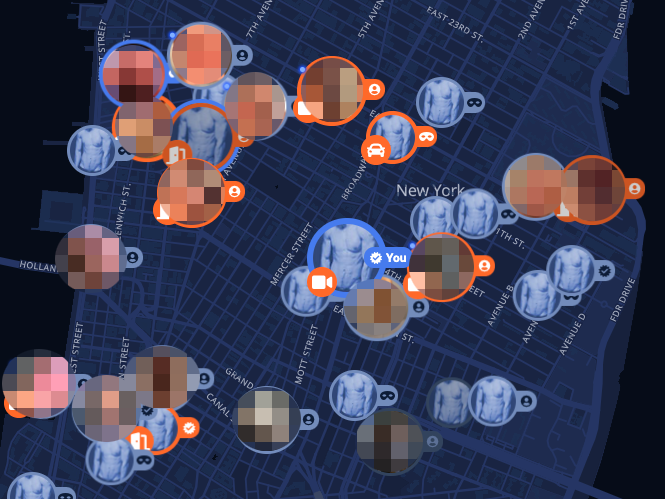
Open a web browser, type the address, and the screen instantly transforms into an interactive street map teeming with colorful pins, glowing clusters, and real-time activity indicators. Unlike traditional matchmaking services that organize men into infinite two-by-two profile grids, Sniffies operates entirely through cartography. A recent Mashable Report on modern queer dating platforms highlights how hookup culture has shifted rapidly toward spatial, proximity-first discovery engines. By abandoning native iOS and Android marketplaces, the platform avoids restrictive corporate app store guidelines, serving up an uncensored, browser-based radar of immediate local encounters.
For first-time visitors and casual observers, navigating this live geographic feed can feel overwhelming. Pins blink across residential neighborhoods, highway rest areas, and commercial hubs, while real-time meters update every few seconds. Knowing what those visual markers mean, and how to inspect the interface without broadcasting your own physical coordinates, is essential before loading the URL.
📌 Key Takeaways:
- The Interface Model: Sniffies operates as a web-based dating app rather than a downloadable native app, running directly inside desktop and mobile browsers to bypass App Store content restrictions.
- Pin Taxonomy: Every marker represents distinct engagement levels, distinguishing individual users from historical cruising spots, bathhouses, and ephemeral group gatherings.
- Privacy Exposure: Anyone opening the site on default settings immediately transmits device coordinates; masking your presence requires manual location offsets or browser-level permission denial.
How the Real-Time Geolocation Map Operates
Traditional dating platforms rely on distance calculations, informing you that an account sits 500 feet or 2 miles away without showing an exact address. Sniffies upends that convention by plotting profiles directly onto an OpenStreetMap-powered interface. The core engine functions as a proximity-based radar, continuously querying your browser’s Geolocation API to position your marker relative to other active participants nearby.
Because the service operates as a progressive web app, it requires no installation from Google Play or the Apple App Store. When you load the domain on mobile Safari or Chrome, the site prompts for device location access. Granting that prompt immediately exposes your latitude and longitude to the network, placing a marker directly over your current physical location unless manual safeguards are enabled. The platform updates positions asynchronously, shifting pins across the map as devices travel, disconnect, or enter dormant modes.
Decoding Map Icon Color Codes and Cruising Zones
The map uses an intricate color and icon taxonomy to convey user intent, activity recency, and venue types. Misreading these symbols often leads casual observers to false conclusions about what is occurring at a specific point on the map.
Standard circular profile icons display profile photos or generic avatars. A tiny glowing green dot adjacent to a profile signifies an active user who logged an interaction within the last 5 to 10 minutes. Yellow or orange rings suggest idling status, while gray indicators reflect accounts that have gone offline within the past 24 hours. Transparent silhouettes mark individuals using anonymous guest browsing without a linked profile.
Specialized markers denote physical venues rather than individual people. Fire icons indicate active zones or gathering points where multiple participants have checked in simultaneously. Small park bench, tree, or restroom icons signify historically recognized cruising spots, public or semi-public areas where outdoor hookups historically occurred. Unlike ephemeral personal pins that disappear when a browser closes, venue pins remain permanently anchored to the geographic grid, accompanied by user-generated reviews, safety advisories, and time-of-day activity trends.
How Sniffies Compares to Legacy Hookup Apps
The rapid rise of map-centric platforms reflects broader fatigue with swipe cards and algorithmic matching. The table below details how Sniffies diverges from established competitors across data delivery, privacy mechanics, and system architecture.
| Operational Metric | Sniffies (Web Platform) | Grindr (Native App) | Scruff (Native App) |
|---|---|---|---|
| Discovery Layout | Interactive live cartography map | Distance-sorted profile grid | Distance-sorted grid & event directory |
| Entry Friction | Zero install; optional guest mode | Mandatory account creation & app install | Mandatory profile setup & verification |
| Location Granularity | Precise street-level pin placements | Distance estimates (feet/meters) | Distance estimates; optional city-only mode |
| Content Regulations | Web-standard policies; uncensored media | Apple/Google guidelines; strict nudity bans | Strict app store compliance limits |
| Subscription Baseline | Freemium ($14, $22/mo for premium tier) | Freemium ($19, $39/mo tier dependent) | Freemium ($15, $25/mo Pro tier) |
Protecting Your Location: Ghost Mode and Coordinate Scrambling
Broadcasting precise GPS markers creates obvious personal safety concerns. Anyone opening the platform in an apartment complex or single-family home risks publishing their exact residence to the public web. Mitigating this risk requires configuring the platform's location privacy settings before actively browsing.
The service incorporates a built-in feature known as ghost mode location hiding. When activated, the software introduces artificial jitter to your GPS signal, displacing your visual pin between 300 and 1,500 feet in a random direction away from your actual position. Other users see your general neighborhood without pinpointing your front door. For higher protection, you can manually drag your anchor pin to a neutral landmark, such as a subway station, shopping plaza, or public park, severing the link between your digital footprint and your private residence.
Browser-level isolation adds an extra layer of operational security. Running the site within an incognito browsing mode window prevents local caches, cookies, and location tokens from persisting once the tab closes. When you shut the browser session, your ephemeral pin vanishes immediately from the live radar, preventing residual tracking by other map viewers.
Account Registration Rules Versus Anonymous Guest Browsing
One of the primary catalysts for curiosity around the map is the low barrier to entry. Unlike platforms that force new arrivals through multi-step email validations, phone verifications, and photo uploads, Sniffies permits anonymous guest browsing right at the doorstep.
Casual observers can view the map without entering any personal data. In guest mode, you can pan across cities, inspect venue markers, read public spot descriptions, and observe relative user density. However, guest browsing carries operational limitations designed to incentivize registration:
- Messaging Restrictions: Guests cannot initiate direct private chats or send media files to active profiles on the map.
- Pin Persistence: Guest pins expire rapidly once user movement stops, whereas registered users retain persistent presence settings.
- Profile Inspection Limits: Unregistered visitors encounter rate limits when attempting to click through full photo albums or view specialized user tags.
- Advanced Filters: Filtering pins by specific physical attributes, relationship statuses, or encounter interests requires creating a free or paid profile.
Registering an account requires only an email address or third-party OAuth login. The platform does not mandate identity verification documents, preserving a layer of pseudonymity that appeals to privacy-conscious users across global jurisdictions.
Managing Physical Risks and Digital Footprints
The convergence of real-time geolocation and physical meetups introduces security variables that extend beyond the screen. Investigative reports across digital rights forums frequently warn against common OPSEC oversights made by casual spectators who transition into active participants.
Digital fingerprinting remains an active consideration. Even when GPS access is denied at the browser prompt, web servers can approximate physical coordinates via IP address mapping. If you inspect the map while connected to home Wi-Fi without a virtual private network (VPN), the platform can locate your service provider’s nearest routing hub, often landing within a few city blocks of your house.
Physical environments carry separate risks. Cruising spots documented on the map are occasionally monitored by local law enforcement or targeted by bad actors looking to exploit individuals seeking private encounters. When inspecting or visiting pinned locations, experienced participants verify recent community notes, avoid isolated zones during off-hours, and never share private residential access without establishing preliminary communication through secure channels.
Frequently Asked Questions (FAQ)
Q1: Can someone track my exact house if I open the Sniffies map?
A1: Yes, if you allow browser location permissions while at home and leave default settings untouched. To avoid this, deny GPS access when prompted, use the site in private mode, or manually drag your pin several blocks away to a public commercial area.
Q2: Do I have to pay to view the map and see active users?
A2: No. The core cartography feed, venue listings, and standard user pins are free to inspect. A monthly premium subscription (typically $14 to $22 per month) unlocks enhanced search filters, unlimited profile views, and expanded photo directories.
Q3: Why do some pins on the map show trees or benches instead of people?
A3: Those symbols mark static community locations rather than live individuals. They highlight outdoor parks, highway rests, or public bathhouses historically used as meeting zones, complete with user-submitted status updates and safety warnings.
Q4: Does browsing in incognito mode hide my activity completely?
A4: Incognito mode only prevents your browser from saving local cookies, history, and active sessions after the window closes. It does not hide your IP address from web hosts. For total network anonymity, combine private browsing with a reputable VPN.
Navigating Map-Based Platforms Responsibly
The move toward live cartography reflects a fundamental transformation in how digital interfaces organize real-world encounters. By stripping away algorithmic matchmaking queues in favor of an open geospatial canvas, the platform offers unprecedented immediacy. That transparency cut both ways: it makes nearby connections instantaneous, but it demands strict vigilance over device permissions and personal data.
Whether you visit out of casual curiosity or intent to participate, the rules of engagement remain straightforward. Inspect the map with location permissions restricted, recognize the difference between live users and static historical pins, and use coordinate-masking tools whenever you decide to light up your marker on the grid.
